Flutter 3.44 and Dart 3.12: Faster Builds, Smarter Tools, and a Framework That Thinks Ahead
You're working with an AI coding agent. It rewrites a widget, applies the change – and the app on your screen just updates. You didn't touch the terminal. You didn't type a single command. The loop closed itself. If that sounds like something from a talk you'd half-believe, well – it shipped in Flutter 3.44 and Dart 3.12.
Announced at Google I/O 2026 under the theme "Everywhere, everyday, built by everyone, for everyone", this release doesn't feel like a routine quarterly drop. It feels like the Flutter team looked at how developers actually work in 2026 – AI agents open in one window, the app running in another, a car dashboard somewhere in the background – and decided to build for that reality instead of the one from three years ago.

Three things define this release. AI-native tooling that changes the daily development loop in ways that are hard to overstate once you've felt them. Platform modernization that finally puts some long-overdue legacy decisions to rest on both iOS and Android. And an architectural shift that's quiet on the surface but significant underneath – one that changes how Flutter itself will grow from here. The details are worth understanding. Let's get into them.
Flutter 3.44: The Release That Changes the Game
Flutter 3.44 is not the kind of release you skim through looking for new widgets. It's the kind you sit with, because the changes underneath – in tooling, in rendering, in architecture – are the ones that quietly reshape how you build. Whether you're working on a mobile app, a desktop tool, or something running on a car dashboard, this version has something that will affect your daily work.
Agentic Hot Reload and the MCP Server
AI coding agents have been able to write and modify your files directly for a while now. But there was always a gap: the agent made a change, and then it was essentially blind. It couldn't see what happened next. It couldn't verify whether the UI actually rendered correctly, whether the logic held up, or whether it just broke something three screens deep. That gap forced developers to step in as the middleman – running the app, checking the result, feeding the feedback back manually.
Flutter 3.44 closes that gap. The Dart and Flutter MCP server – built on the Model Context Protocol – can now automatically find your running Flutter application and trigger a hot reload the moment an agent applies a code change. The agent modifies a file, the app updates, and the agent can immediately observe the result and keep iterating. No human in the middle. No context switch. Just a tight, self-correcting loop between the agent and the live application.

What makes this more than a convenience feature is the direction it signals. Agentic development – where AI agents don't just suggest code but actively participate in the build process – is becoming a real workflow, not a novelty. Flutter 3.44 is the first version of the framework that was built with that workflow in mind from the start. That's a meaningful line to cross.
Agent Skills and Dart Tooling Integration
Hot reload is only half of the picture. An agent that can push changes and watch them render is already useful – but an agent that can also check whether those changes actually make sense is a different thing entirely. That's where Agent Skills come in.
With Flutter 3.44, the results of dart analyze and dart format are now directly consumable by AI agents through the MCP server. Which sounds technical, but the practical upshot is simple: the agent writes code, gets immediate feedback from the Dart toolchain, figures out what's wrong, and fixes it – all before you've even glanced at the file. No more silently broken imports. No more formatting issues that pile up until someone runs the linter in frustration.

There's something almost funny about how obvious this feels in hindsight. Developers have had this loop forever – write, analyze, fix, repeat. Giving agents access to the same tools just makes them actually useful in the way we always hoped they'd be. Not a glorified autocomplete, but something that can genuinely take ownership of a task and see it through.
Together, Agentic Hot Reload and Dart tooling integration don't just make things faster. They change what it means to work alongside an AI agent in a Flutter project – from "it helps me write code" to "it handles this, I'll handle that."
Android Gets Serious: Hybrid Composition++
Here's a problem that's been quietly annoying Flutter developers on Android for years. When you need to embed a native Android view inside a Flutter app – a map, a camera feed, a WebView – you hit a fundamental tension. Flutter renders its own UI on its own thread, and native views render separately. Getting them to play nicely together has always involved a trade-off: you either get smooth frame rates or accurate rendering, but consistently landing both at the same time has been genuinely difficult.
The two existing approaches both had their costs. Virtual Display kept everything on Flutter's rendering thread but caused input issues and visual glitches. Hybrid Composition fixed the visual fidelity but introduced frame drops that you could feel while scrolling. Neither was wrong exactly – they were just working around a constraint that hadn't been properly solved yet.
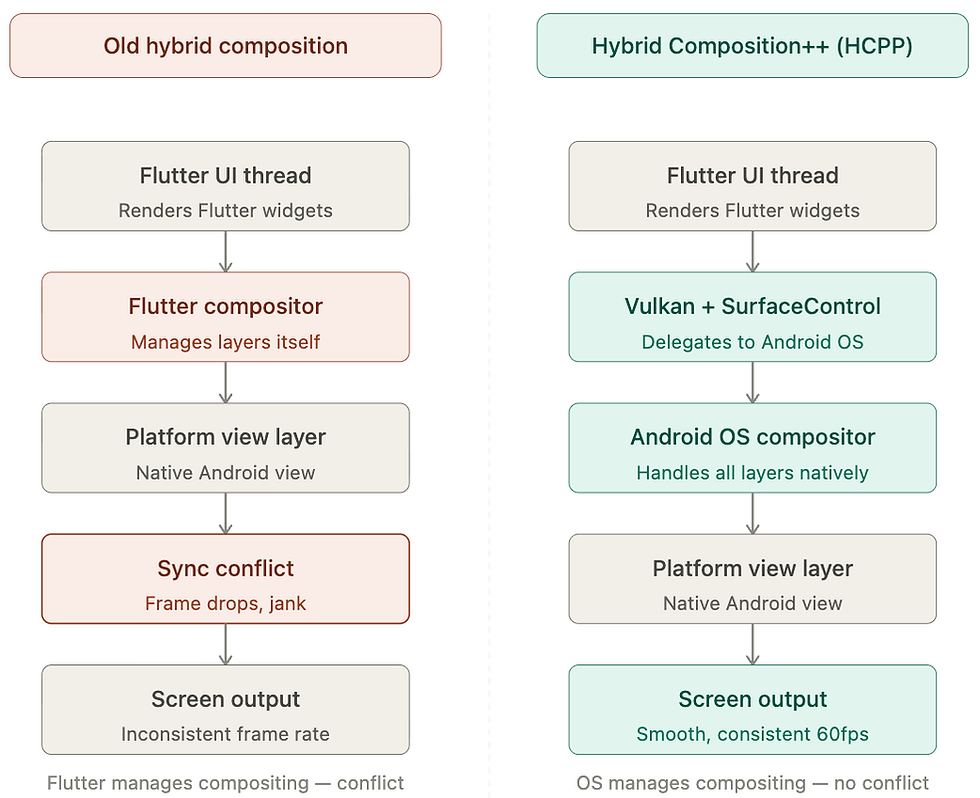
Flutter 3.44 solves it. Hybrid Composition++ – HCPP – takes a fundamentally different approach by delegating the compositing work directly to the Android OS, using Vulkan and SurfaceControl. Instead of Flutter trying to manage the layering itself, it hands that responsibility to the system, which is considerably better at it. The result is smoother scrolling, more reliable touch input, and SurfaceView support that actually works the way you'd expect it to.
It's opt-in for now, which is the right call – giving teams time to test before committing. But for anyone who's spent time debugging Platform Views jank on Android, this one's worth paying attention to.
iOS and macOS: The End of CocoaPods
If you've ever set up a Flutter project for iOS and found yourself installing Ruby, running pod install, waiting, hitting a version conflict, installing a different Ruby, running pod install again – you know exactly why this change matters. CocoaPods has been the default dependency manager for iOS and macOS Flutter projects for years, and for most of that time it's been a reliable source of friction that had nothing to do with your actual app.
Flutter 3.44 makes Swift Package Manager the new default for iOS and macOS. SwiftPM is bundled directly with Xcode, which means no Ruby, no pod install, no external toolchain to maintain. Dependencies are resolved natively, indexing is faster, and the whole setup feels like it belongs in the Apple ecosystem – because it does. It's the way Apple itself manages dependencies, and Flutter finally aligns with that.

For teams already on CocoaPods, migration isn't instant but it's straightforward. The main thing to check before upgrading is whether your third-party plugins have SwiftPM support – older packages may not have updated their build configurations yet. If you have a legacy Podfile, the safest move is to audit your dependencies first, then clean out the old build artifacts before running flutter pub get fresh.
It's one of those changes that sounds administrative until you've lived through one too many pod install failures at 11pm before a release. Good riddance.
Architectural Decoupling: Material and Cupertino Leave the Core
This one doesn't come with a flashy demo or a moment that gets applause at a conference. But it might be the most consequential structural decision in Flutter 3.44 – the kind that you appreciate more six months from now than you do today.
Up until this release, the Material and Cupertino widget libraries lived directly inside the Flutter SDK. That sounds fine until you think about what it actually means: every new Material 3 component, every Cupertino fix, every small design system update had to wait for a full SDK release cycle. Three months, minimum. For a design system that's supposed to keep pace with what Apple and Google are shipping, that's a long time to wait for a bug fix in a bottom sheet.
Starting with Flutter 3.44, both libraries are frozen in the core SDK and will move to standalone pub.dev packages – material_ui and cupertino_ui – with their own independent versioning. In practice, this means design system updates can ship the moment they're ready, without waiting for the next quarterly release. For teams that iterate heavily on UI, that's a meaningful change in how fast they can move.

There's another angle worth mentioning. Eventually, if your app only uses Cupertino widgets, you won't have to bundle the entire Material library in your binary. Smaller apps, faster builds, less dead weight. The full payoff is still a release or two away, but the decision that makes it possible was made right here.
In 3.44, you'll start seeing deprecation warnings if you're importing from the built-in versions. It's a good time to start planning the migration rather than waiting until it becomes urgent.
AI as a First-Class Citizen: GenUI and Genkit Dart
There's a version of AI in apps that most people are tired of already – a chat bubble in the corner that responds with a wall of text. You ask it something, it writes three paragraphs, you skim them, close the bubble, and go back to tapping through the actual UI. Helpful in theory, clunky in practice.
Flutter 3.44 takes a different position on what AI in an app should look like. With the GenUI SDK and the open A2UI protocol, AI agents don't respond with text – they respond with actual Flutter widgets. The agent receives a user request, picks from a curated catalog of your app's existing components, and composes a real, interactive UI on the fly. Buttons, date pickers, input fields – not described, but rendered. The user interacts with them, the state feeds back to the agent, and the loop continues.
At Google I/O 2026, two apps demonstrated this live. Finnish it – a language-learning app built by Flutter GDE Cagatay Ulusoy – showed the agent generating UI dynamically based on what the learner was trying to do. Hatcha, an event-planning app, did the same in a completely different context. Both made the same point: when AI composes UI instead of text, the interaction quality jumps considerably.
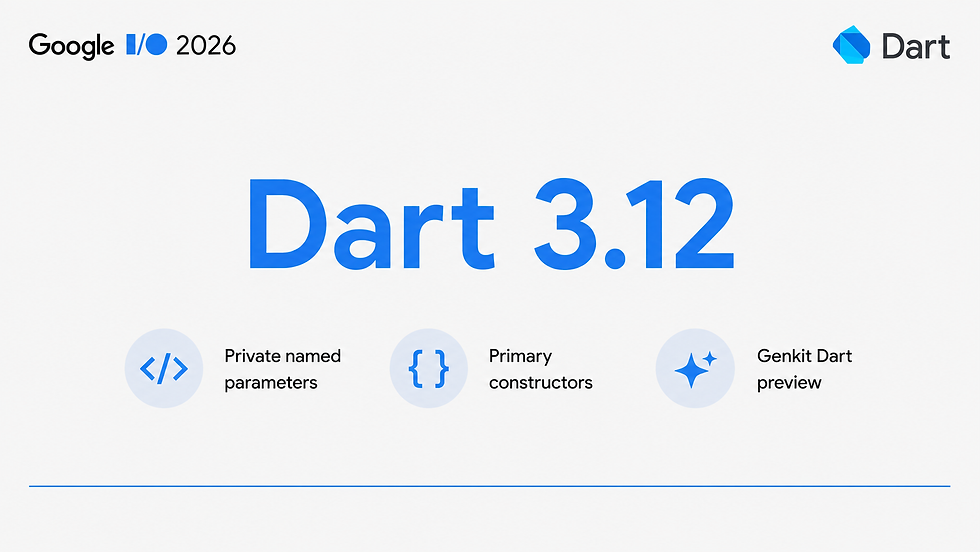
On the backend side, Genkit Dart – currently in preview – gives Dart developers a proper framework for building AI-powered applications without picking a side in the model wars. It's model-agnostic by design, supporting Google, Anthropic, OpenAI, and compatible models through a unified, type-safe API. There's a built-in local developer UI for testing prompts and tracing flows, structured output and tool calling out of the box, and – crucially – the same AI logic can run on a Dart backend server or directly inside the Flutter app. You write it once and decide later where it lives.

Taken together, GenUI and Genkit Dart aren't just features. They're Flutter's answer to the question every development team is asking right now: how do we build AI into our product without it feeling bolted on?
Desktop, Web, and the Embedded Frontier
Flutter's "write once, run anywhere" promise has always been more of a direction than a guarantee. But with each release it gets a little more literal – and 3.44 pushes that further than any version before it.
On desktop, this release is one of the strongest Flutter has ever shipped for non-mobile targets. Experimental multi-window APIs are now available, with macOS getting popup window support and Linux gaining content-sized views that resize dynamically based on their content. Windows developers got something unexpected and genuinely useful: stylus input support, including precise tracking for both rotation and pressure sensitivity. If you're building anything for digital artists, note-taking, or annotation on Windows, that's not a small thing.
On the web side, the changes are less visible but arguably more important. Shared garbage collection between CanvasKit and Skwasm cleans up a category of weird browser bugs that were hard to reproduce and harder to explain to clients. DevTools now compiles to WebAssembly by default, which means the tools you use every day are meaningfully snappier without you having to do anything. And Widget Previewer improvements – leaning on the Dart Analysis Server instead of spinning up a full Flutter process – cut IDE memory usage by up to 50%. Again, nothing you'll notice in a changelog, but very much something you'll feel over a long session.
And then there's the part that genuinely surprised people watching the keynote. Flutter now powers the multimedia system in the 2026 Toyota RAV4. Not a prototype, not a concept – a production car, on sale now, with a Flutter UI on the dashboard. Meanwhile, LG's webOS SDK is on its way, bringing Flutter to smart TVs with full support for hot reload, Riverpod, Firebase plugins, and more.
The "everywhere" in Flutter's Google I/O theme stopped being aspirational somewhere around the time a RAV4 drove onto the stage. It's just a description now.

Dart 3.12: The Language Catches Up
Dart doesn't always get the spotlight at Flutter releases – that usually goes to the widgets, the rendering engine, the platform integrations. But 3.12 is worth slowing down for. The language changes in this version are small in scope and large in daily impact – the kind of updates that don't make headlines but quietly make every class you write a little less annoying.
Private Named Parameters
Here's a situation every Dart developer has run into. You have a class with a private field – say, label. You want to initialize it through a named constructor parameter. Simple enough in theory, but before Dart 3.12, the language would throw an error the moment you tried to name that parameter label. Named parameters starting with an underscore simply weren't allowed.
The workaround was exactly as tedious as it sounds. You'd declare a public parameter with a clean name, then manually assign it to the private field in the initializer list – extra lines, extra noise, extra things to keep in sync when the class changes. It worked, but it was the kind of boilerplate that made you wonder why the language was making you repeat yourself.
// Before Dart 3.12
class MyWidget {
  final String _label;
  final int _count;

  MyWidget({required String label, int count = 0})
      : _label = label,
        _count = count;
}
Dart 3.12 just handles it. You declare the parameter with the underscore, the language automatically strips the leading _ to derive the public name at the call site, and the initializer list writes itself. Same behavior, a fraction of the code.
// Dart 3.12
class MyWidget {
  MyWidget({required String _label, int _count = 0});
}
The caller still uses the clean public name – MyWidget(label: 'Hello', count: 3) – and the private field is initialized correctly behind the scenes. No boilerplate, no manual assignment, no mismatch risk when someone renames the field and forgets to update the initializer.
It's a small fix. It's also the kind of small fix that makes you realize how much unnecessary friction you'd quietly accepted as normal.
Primary Constructors (Experimental)
If private named parameters fix an annoyance, primary constructors fix something that's been quietly bothering Dart developers for much longer. The problem is simple: even the most basic class in Dart requires you to write the same information two or three times. You declare the fields, you declare the constructor parameters, you assign one to the other. For a class with two fields it's manageable. For a class with five it starts to feel like you're writing a form in triplicate.
// Before Dart 3.12
class UserProfile {
  final String userId;
  final String email;
  final int age;

  UserProfile({
    required this.userId,
    required this.email,
    required this.age,
  });
}
Primary constructors let you collapse all of that into the class header itself. The fields are declared once, the constructor is implied, and the whole thing fits on a single line.
// Dart 3.12 – experimental
class UserProfile(
  final String userId, {
  required final String email,
  required final int age,
});
Same class, same behavior, considerably less noise. If you've written Kotlin or Swift, this will feel immediately familiar – both languages have had equivalent syntax for years, and Dart developers have been asking for it almost as long.
The important caveat is that primary constructors are experimental in Dart 3.12. That means the syntax is available and functional, but it may still evolve based on community feedback before it stabilizes. For production codebases, it's worth keeping an eye on rather than adopting everywhere at once. For personal projects or internal tooling, it's already pleasant enough to use today.
What's clear is the direction. Dart is actively reducing the gap between what you want to express and how much code it takes to express it. Primary constructors are one of the more visible steps in that direction – and given how the language has been moving lately, the stable version likely isn't far off.
Conclusion
Flutter 3.44 and Dart 3.12 land at an interesting moment. AI is reshaping how code gets written, platforms are finally getting the native treatment they deserved years ago, and the architecture underneath Flutter is quietly being set up for a future that looks very different from its past.
Not every change in this release will affect you on day one. But the direction is clear – and it's coherent. AI-native tooling, platform modernization, architectural decoupling. Three themes that reinforce each other and point the same way.
If you build with Flutter, this is a release worth understanding deeply, not just skimming. The features that seem small today have a habit of becoming the ones you can't imagine working without.
From Framework Updates to Real Products
Flutter 3.44 raises the bar for what cross-platform development can look like – and meeting that bar takes more than just upgrading the SDK. If you're thinking about how to bring these capabilities into your product, modernize your Flutter architecture, or build something AI-native from the ground up, we'd love to talk it through – Contact us.


Comments