AI in Our Workflow: What We Automate and Where We Draw the Line
Most development teams that say they use AI are doing one of two things: blindly generating code nobody fully reviews, or slapping "AI-powered" on their website because it sounds good in 2026. Neither of those is a strategy. Both will cost you eventually.
We do neither.
We use AI tools every day – across coding, testing, design, and documentation. And we have strict rules about where they're allowed and where they're not. The result is software that gets built faster without the shortcuts that come back to bite you six months after launch.
What does that actually look like in practice? Which tools, which tasks, and where does human judgment take over completely? This article breaks all of that down – so next time someone tells you they "use AI," you'll know exactly what questions to ask.

What You're Actually Paying For
If you're evaluating a development partner and they mention AI tools, there's usually one question that pops up almost immediately: "If machines are doing the work, what exactly am I paying for?"
It's the right question. And it deserves a straight answer.
Here's the thing though – you were never paying for keystrokes. Not really. What you're paying for is the judgment call that prevents a bad architecture decision from becoming a four-month refactor. The engineer who looks at a feature request and says "this will break at scale, here's why." The team that actually understands your business well enough to push back when something doesn't make sense.
AI can't do any of that. It doesn't know your users, your market, or the three pivots your product went through before it became what it is today. That context lives in conversations, in experience, in domain knowledge that takes years to build.
What AI does is get rid of the routine tax. Every hour a senior developer spends writing boilerplate, generating test stubs, or formatting documentation is an hour they're not thinking about your product. That's the trade-off we've fixed.
As for the quality concern – the quiet fear that AI-assisted development means technical debt that only surfaces six months post-launch – we hear it. That's exactly why every piece of AI-generated code goes through the same review process as anything written by hand. No shortcuts. No fast lanes. The tools move faster. The standards don't move at all.
More AI in our process means more of our team's expertise pointed at your actual problem. That's the deal.
What's Actually Changed in Development
A few years ago, "AI in development" meant your IDE autocompleted a variable name. Useful? Sure. A shift in how software gets built? Not even close.
What's happening now is a different thing entirely.
Tools like GitHub Copilot, Cursor, and a handful of others have fundamentally changed the pace at which experienced developers can work. Right now, they're not replacing what developers do – they're removing the friction that slows them down. Writing a standard API wrapper used to take a few hours of focused work. Today it takes twenty minutes, and the developer spends the rest of that time thinking about whether the API should exist in the first place.
That's the shift. Less time executing the obvious. More time questioning whether the obvious is even right.
It's not unlike what happened when calculators became standard for accountants. Nobody panicked that math was being automated. Because the valuable part of the job was never arithmetic – it was knowing which numbers mattered and what to do with them. The calculator just cleared the path. For now, software development works the same way. Understanding a problem deeply enough to solve it properly – knowing when a seemingly clean solution is quietly building three new problems – that's still human work.
What's changed is that the best teams now have more time for exactly that. The teams that haven't adapted are still spending a significant chunk of every sprint on work that no longer requires their full attention.
We made a choice to be in the first group. Not because AI is trendy, but because it makes us meaningfully better at the work that actually matters to our clients.
Our AI Stack
Four tools. Four different parts of the workflow. Each one chosen for a specific reason – and each one with clear limits on what it's allowed to touch.
GitHub Copilot – Writing Code, Faster
Let's start with the most visible part of the stack – the tool that actually sits inside the code editor and watches developers work.
GitHub Copilot lives directly in the IDE and acts like a very fast, very well-read pair programmer who never needs a coffee break. Cursor works on a similar principle – we use it selectively on certain projects – but Copilot is our everyday driver.

It handles the parts of coding that are more transcription than thinking – standard data models, API integrations, test scaffolding, utility functions. Copilot writes the obvious parts first, and the developer either accepts, adjusts, or tosses the suggestion.
But here's something most teams skip: out of the box, Copilot doesn't know how you work. It doesn't know your project's conventions, your preferred patterns, or the architectural decisions your team made six months ago. So we don't use it out of the box.
For every project, we maintain dedicated instruction files – structured documents that tell Copilot exactly how we want it to behave. Think of it as an onboarding doc, but for an AI. The kind of context a new developer would absorb over their first few weeks – written down and fed into the tool from day one.
What we define in instruction files:
📐 Code style – indentation, formatting rules, naming conventions for variables, functions, and files
🏗️ Project-specific patterns – key abstractions, class structures, and architectural decisions that are unique to this codebase
🚫 Hard restrictions – libraries we don't use, patterns we've explicitly ruled out, legacy areas not to touch
But the real value isn't in the initial setup – it's in how the file evolves. When Copilot makes a mistake, we don't just fix it and move on. We go back to the instruction file, find the gap, and patch it so the same mistake doesn't happen again. Over time, the file becomes a precise, project-specific rulebook that turns Copilot from a generic assistant into something that feels like it's been on the team for months.
Without Copilot | With Copilot | |
Standard API integration | 4–6 hours | 1–2 hours |
Test scaffolding | Half a day | 1–2 hours |
Boilerplate & data models | 2–3 hours | 20–40 minutes |
Overall dev speed | Baseline | +20–30% |
Where Copilot works best:
✅ CRUD operations – generating standard create, read, update, delete logic across entities without writing the same structure over and over.
✅ API integrations – connecting to third-party services where the pattern is well-established and the documentation is clear.
✅ Test scaffolding – generating the skeleton of unit and integration tests so developers focus on writing assertions, not setup code.
✅ Data models & DTOs – translating database schemas or API contracts into typed models quickly and consistently.
✅ Repetitive utility functions – formatters, validators, parsers – the kind of helpers every project needs but nobody wants to spend an afternoon writing.
✅ Documentation comments – generating inline code documentation based on what the function actually does.
✅ Log analysis – paste error logs or runtime output directly into the chat and Copilot will analyze the behavior, identify patterns, and suggest where the issue likely originates – no manual digging required.
What that looks like across a full project: tasks that used to take a full day now take a morning. That time goes straight back into the parts of the project that actually need human attention – architecture, business logic, edge cases that matter.
There's one thing worth being clear about though. Copilot suggests. Developers decide. Every suggestion gets read, evaluated, and either accepted or rewritten. We don't ship code we haven't understood just because an AI generated it confidently. Confidence is not correctness – and that's a lesson that applies to humans and AI tools equally.
Claude – From Messy Requirements to Clear Documentation
Every project starts with a conversation. Sometimes it's a detailed brief, sometimes it's a rough idea scribbled in a Google Doc, and sometimes it's an hour-long call where everyone leaves with a slightly different understanding of what was agreed. That gap between "what the client meant" and "what the team builds" is where a lot of projects quietly go wrong.
This is where Claude earns its place in our workflow.

We use Claude at two stages where clarity matters most – requirements analysis and documentation. Feed it a messy brief, a transcript of a stakeholder call, or a scattered list of feature ideas, and it structures that input into something a development team can actually work from. User stories, acceptance criteria, technical summaries – the kind of output that usually takes a few hours of careful writing after the meeting.
It's worth mentioning that Claude also has a coding-focused counterpart – Claude Code, a command-line tool built for agentic development tasks. We've been keeping a close eye on it. For now, GitHub Copilot remains our go-to for in-editor coding assistance, but Claude Code is definitely on our radar as the tool matures.
Where Claude works best:
✅ Requirements structuring – turning unstructured client input into clean, developer-ready user stories with acceptance criteria.
✅ Technical documentation – generating first drafts of API docs, onboarding guides, and feature descriptions based on existing code or specs.
✅ Meeting summaries – converting call transcripts or notes into structured decision logs with clear action points.
✅ Specification review – cross-checking a requirements document for gaps, contradictions, or ambiguous language before development starts.
✅ Communication drafts – helping translate complex technical decisions into clear, jargon-free language for non-technical stakeholders.
One important detail: Claude produces drafts. A developer or project manager always reviews the output before it goes anywhere near a client or a codebase. The goal isn't to automate communication – it's to cut the time spent on formatting and structuring so the team can focus on the content that actually requires their judgment.
Notion AI & Jira Rovo – Keeping Projects From Falling Apart
Here's something nobody talks about enough: a huge amount of project time gets lost not in development, but around it. Meetings that don't produce clear outcomes. Tasks that get lost between tools. Context that exists in someone's head but never makes it into the tracker. By the time a project hits its third sprint, the gap between "what's actually happening" and "what the PM thinks is happening" can be surprisingly wide.
Notion AI and Jira Rovo are how we close that gap.
Both tools bring AI into project management – but they serve slightly different purposes in our workflow. Notion AI handles the knowledge side: meeting notes, documentation, internal wikis. Jira Rovo lives inside the task tracker and helps with everything from writing ticket descriptions to surfacing blockers across the board.
Where Notion AI works best:
✅ Meeting summaries – automatically structures notes and highlights key decisions and action points so nothing gets lost after a call.
✅ Project knowledge base – keeps documentation organized and searchable as the project grows, without it becoming a manual overhead.
✅ Onboarding new team members – a well-maintained Notion space means new developers get up to speed faster, with less time spent explaining context that should already be written down.

Where Jira Rovo works best:
✅ Ticket generation – turns a rough feature description into a properly structured Jira ticket with acceptance criteria and subtasks.
✅ Blocker detection – analyzes the board and flags dependencies or stalled tasks before they quietly delay the sprint.
✅ Sprint summaries – generates a clear picture of what was completed, what slipped, and why – useful for both internal retrospectives and client updates.

For clients, this means better visibility into what's happening on their project without requiring a dedicated status call every other day. Everything is documented, structured, and up to date – not because someone spent an afternoon on admin, but because the tools handle it as the work happens.
Figma AI – Design That Starts With a Direction, Not a Blank Canvas
Design is one of those stages where time disappears fast. A stakeholder has a rough idea in their head, the designer needs something tangible to react to, and the gap between "I'll know it when I see it" and an actual UI concept can eat days of back-and-forth before a single real decision gets made.
Figma AI compresses that gap significantly.
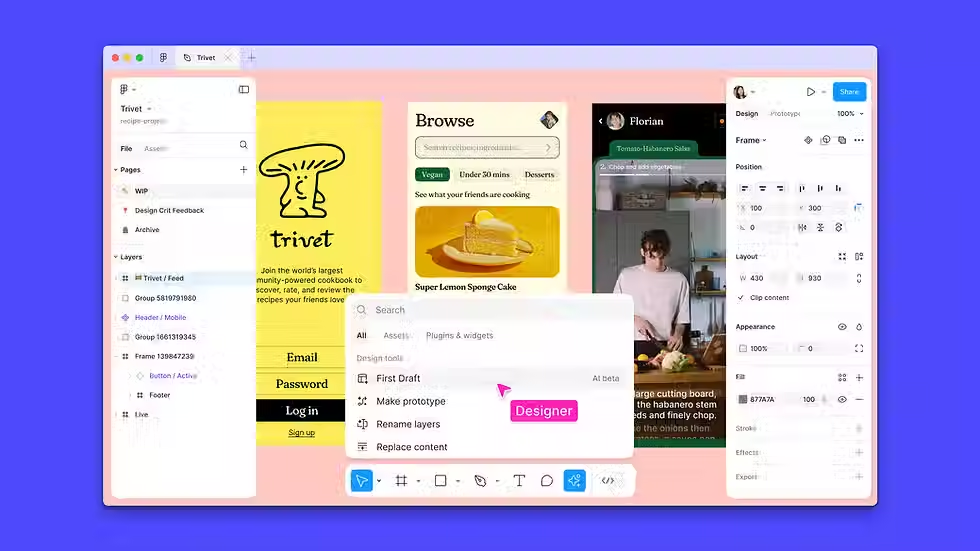
The way we use it isn't about generating finished designs – it's about eliminating the blank canvas problem. Give Figma AI a description of a screen, a user flow, or a layout concept, and it produces a starting point. Something concrete to look at, react to, and either build on or push against. That first draft – even an imperfect one – changes the entire dynamic of a design conversation.
Where Figma AI works best:
✅ Early-stage wireframing – generating rough layout concepts from a feature description so the team has something to align around on day one.
✅ UI variations – quickly producing multiple layout options for a screen so decisions are based on actual visual comparisons, not abstract preferences.
✅ Component suggestions – proposing UI patterns that fit the existing design system, keeping consistency without slowing down exploration.
✅ Copywriting placeholders – filling layouts with realistic placeholder text instead of generic "Lorem ipsum" so designs feel closer to the real product during reviews.
What doesn't change: a senior designer owns every screen that moves forward. AI output is raw material, not a deliverable. The judgment calls – hierarchy, user flow, accessibility, brand alignment – those stay firmly with the person who understands both design craft and your product's context.
The result for projects is a faster path from brief to feedback. Less time waiting for the first draft. More time refining the version that actually ships.
Where AI Doesn't Work: Our Hard Limits
Every tool has a boundary. The teams that get into trouble with AI are usually the ones that never defined where theirs was.
We did. Early on. And honestly, being clear about what we don't automate has done more for client trust than any list of tools we use ever could.

🏗️ Architecture decisions → Senior engineers only
How a system is structured – how components interact, how data flows, how the product scales when the user base doubles – that requires understanding your business, your constraints, and the trade-offs that only become obvious with experience. An AI tool can inform that conversation. It doesn't lead it.
👁️ AI-generated code → Always reviewed
No exceptions, no fast lanes. If a Copilot suggestion introduces a subtle bug, a security gap, or logic that technically works but doesn't belong in this codebase – that gets caught in review. The same review process that applies to everything else applies here. We don't ship code we haven't read and understood.
🤝 Client context → Never automated
No language model knows why your product exists, what your users actually struggle with, or the history of decisions that shaped the current version. That understanding comes from real conversations and it drives everything from feature prioritization to technical trade-offs. This part of the work will always be human.
🔒 Your data → Never leaves your hands
This one is non-negotiable. Confidential business logic, sensitive user data, proprietary workflows – none of it gets submitted to public AI tools. Where AI is used with any project-related content, we work exclusively with enterprise-tier services with data retention disabled. Your information stays yours.
Here's the uncomfortable truth about AI in development: the risk isn't that the tools are bad. The risk is that they make it easier to move fast in the wrong direction. A confident-sounding AI suggestion can send an entire sprint down a path that a senior engineer would have flagged in five minutes.
That's why every AI tool in our workflow operates inside a process – not instead of one. The tools speed things up. The process makes sure we're speeding in the right direction.
What This Means for Your Project
Everything in the previous chapters is really just context for one question: what does this mean for you, practically, when you're working with us?
Here's the honest answer.
Without AI-assisted workflow | With AI-assisted workflow | |
Routine dev tasks | Completed as part of standard sprint | Completed faster, freeing time for complex work |
Documentation | Written in dedicated time blocks | Generated alongside the work in real time |
Bug detection | Caught during standard QA and review | Caught earlier across more of the codebase |
Client visibility | Regular status calls and manual updates | Structured, always up to date automatically |
Overall speed | Baseline | +20–30% |
⚡ Faster delivery without the usual trade-offs
The routine tasks that used to quietly consume sprint capacity – boilerplate, test scaffolding, documentation, ticket writing – get handled faster. That time doesn't disappear into our margins. It goes back into your project. Into the features that needed more thought, the edge cases that deserved more attention, the performance work that usually gets cut when deadlines tighten.
📋 You'll actually know what's happening
One of the most underrated benefits of AI-assisted project management is documentation that stays current. Meeting decisions get captured. Tickets get written properly. Sprint summaries exist and make sense. The result is a client who's genuinely in the loop – not because we scheduled an extra status call, but because the information is just there.
🔍 Fewer surprises late in the project
AI-assisted code review and test generation means more of the codebase gets checked, more consistently, earlier in the process. The bugs that usually surface two weeks before launch – because nobody had time to write proper tests in sprint three – are more likely to get caught when they're still cheap to fix.
🧠 A team thinking about your problem, not fighting their tools
When developers aren't spending half their day on mechanical work, they bring more attention to the parts of the project that actually require it. That shows up in the quality of technical decisions, in proactive communication, and in a final product that feels considered rather than assembled.
Conclusion
One last thing before you go.
If you're evaluating development partners and AI keeps coming up in conversations – ask them one specific question: "What do your engineers do when the AI gets it wrong?"
Not a trick question. Just a practical one. The answer tells you everything about whether a team actually has a process around their tools or just a subscription to Copilot and a good marketing page.
A team that uses AI thoughtfully will have a fast, specific answer. They'll tell you about code review, about hard limits on what gets automated, about the difference between AI-assisted and AI-driven. A team that doesn't will get vague.
Now you know what a good answer sounds like.
The AI tools are ready. The workflows exist. The only thing that actually varies between development teams is the discipline around them – and the people doing the thinking.
Don't just ship faster. Ship smarter. Because the difference between a product that launches and a product that lasts is whether the people building it were actually thinking – or just executing.
Get in touch – let's build something that holds up long after the sprint ends.
Frequently Asked Questions (FAQ)
1. If AI is writing code, am I paying for less work?
Not quite. You were never paying for the amount of code written – you were paying for the decisions behind it. Architecture, trade-offs, the judgment call that prevents a bad technical decision from becoming a four-month refactor. AI handles the mechanical parts. Your engineers handle everything that actually requires thinking.
2. How do I know AI-generated code is safe and reliable?
Every line goes through the same review process as handwritten code. No exceptions, no fast lanes. Copilot suggests – our engineers decide. If something looks off, it gets rewritten. The review process doesn't change because the source did.
3. Does AI-assisted development mean faster delivery at the cost of quality?
It's actually the opposite in practice. Faster routine work means more time for the parts that determine quality – architecture, edge cases, proper test coverage. The 20–30% speed increase we see across projects doesn't come from cutting corners. It comes from cutting noise.
4. What happens when the AI gets something wrong?
It gets caught in review and rewritten. This is exactly why we don't treat AI output as final output. The tools are part of the process – they don't replace it. When something slips through suggestions that don't fit the codebase, the logic, or the project's standards, a developer catches it. That's what code review is for.
5. Do you use AI for every project or only some?
We use it across all active projects – but the degree varies depending on the nature of the work. Highly experimental or architecturally complex projects naturally involve more human-led decisions. Routine product development sees the most benefit from AI assistance. Either way, the same principles apply: every tool has a defined role, and every output has a human checkpoint.


Comments