How to Build an AI-Powered Recommendation System with Flutter and Dart
Recommendation systems are the invisible engines behind today’s most engaging digital experiences. Whether it’s suggesting the next movie to watch, a product to buy, or a post to read, intelligent recommendations make users feel understood – and keep them coming back. Traditionally, these systems required complex machine learning pipelines and heavy infrastructure. But with recent advances in embeddings and vector search, it’s now possible to build efficient, AI-powered recommendations even with a lightweight tech stack.

In this article, we’ll explore how to create a recommendation system fully powered by Dart, combining a Flutter mobile app with a Dart backend connected to PostgreSQL. We’ll use text embeddings to represent content semantically and measure similarity between user queries and stored items – all without relying on external ML services.
Understanding Recommendation Systems
Recommendation systems are at the heart of many modern digital experiences. They analyse user behaviour, preferences, and context to suggest content or products that match individual interests. Whether it’s Netflix proposing the next movie, Spotify curating playlists, or an online store recommending similar items – these systems shape how users interact with content every day.
There are three main types of recommendation systems:
Collaborative filtering – relies on user behaviour patterns. If two users have similar tastes, items liked by one may be recommended to the other
Content-based filtering – focuses on item characteristics. The system analyses features (like genre, category, or description) and recommends similar ones
Hybrid systems – combine both approaches to achieve better accuracy and coverage
While traditional methods work well, they often depend on manually defined features or large user datasets. This is where embeddings come in – offering a more flexible and intelligent way to represent and compare data.
1. How Embeddings Work
Embeddings are numerical representations of information – words, sentences, or even entire documents – in a multi-dimensional vector space. Instead of comparing text by keywords or categories, embeddings allow us to measure semantic similarity: how close in meaning two pieces of information are.

For example, the phrases “watch a sci-fi movie” and “find a science fiction film” may look different, but their embeddings will be close in vector space because they express the same intent.This enables a much more natural and context-aware recommendation process.
At the core of this approach lies the concept of vector similarity – most often measured using cosine similarity. The closer two vectors point in the same direction, the more semantically similar they are.
One convenient way to generate embeddings is through OpenAI’s embeddings endpoint, which can convert text or other data into numerical vectors automatically. This allows developers to focus on building recommendation logic without worrying about training complex models from scratch.
2. Storing Embeddings
Once you have embeddings, you need a way to store and query them efficiently. PostgreSQL provides a great solution with its VECTOR data type (available through extensions like pgvector).
This allows you to store each embedding as a single column in a table and perform similarity searches directly in SQL. For example, you can find the top N most similar items to a query embedding with just one query, without additional processing.
Using PostgreSQL for embeddings keeps your system simple, scalable, and fully integrated with your existing database logic – making it ideal for building AI-powered recommendation systems with Dart and Flutter.
Bringing It to Life: Designing and Building the App
Now that we’ve covered the fundamentals of recommendation systems and how embeddings help capture semantic meaning, it’s time to bring these ideas into a real-world scenario.
In this section, we’ll build a movie recommendation app using Flutter for the frontend and Dart for the backend. The app will display a catalog of movies, and when a user opens a movie’s page, it will suggest similar titles based on embeddings stored in PostgreSQL.
1. Designing the Architecture
When building a recommendation-based app, it’s important to design a system where each component has a clear and independent role. In our case, we separate the Flutter UI, the Dart backend, and the PostgreSQL database, while also integrating OpenAI for embedding generation. This modular approach keeps the app scalable, testable, and easier to maintain.
The Flutter UI focuses purely on user interaction – displaying the movie catalog, showing details, and rendering a list of similar movies. It communicates with the backend through REST or gRPC endpoints, sending requests such as “get movie details” or “fetch similar movies.”
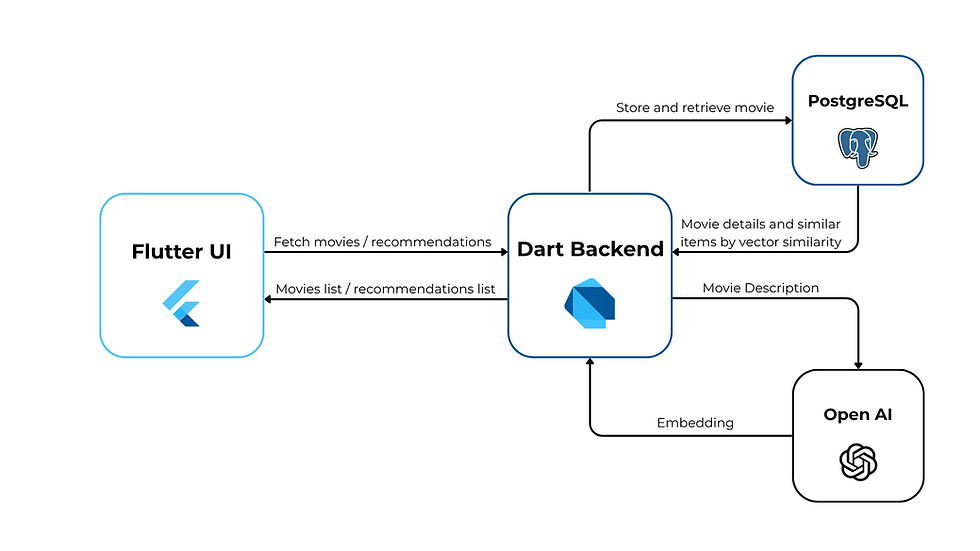
The Dart backend acts as the brain of the system. It receives requests from the Flutter app, queries PostgreSQL for movie data, and, when needed, interacts with OpenAI to generate or update embeddings. The backend then performs vector similarity searches in PostgreSQL to find related movies and returns them to the Flutter UI.
Finally, PostgreSQL stores all essential movie information – titles, descriptions, genres, posters, and embedding vectors. Thanks to the VECTOR type and built-in similarity operators, it can quickly compare embeddings and deliver accurate results in a single query.
The communication between components can be visualized in a simple interaction diagram:
2. Implementing the Flow
With the architecture defined, let’s look at how each part of the system interacts in practice – starting from the backend logic that delivers the recommendations to the user’s action in the Flutter app.

2.1 Dart Backend
The Dart backend acts as the central intelligence of our recommendation system – it processes requests from the Flutter client, interacts with PostgreSQL to fetch and store data, and communicates with OpenAI to generate embeddings for our movie catalog.
Before we start handling embeddings, we need to decide what text data will be used to represent each movie. A good embedding depends on the quality and context of the text we feed into the model. For that reason, we’ll combine the movie’s key attributes – title, release year, cast, genres, and a short extract – into a single string.
We can conveniently generate this text by adding a computed property to our MovieModel:
  String get textForEmbedding => '$title ($year)\n'
      'Actors: ${actors.join(', ')}\n'
      'Genres: ${genres.join(', ')}\n'
      'Extract: $extract';
2.1.1 PostgreSQL
For database operations, we’ll use Drift ORM, which offers a type-safe and reactive interface for working with PostgreSQL. Drift allows us to define database tables directly in Dart, generate queries automatically, and keep our data layer clean and maintainable.
If you need a detailed setup guide for connecting Drift with PostgreSQL, check out ORM in Dart – it covers everything from schema generation to database connection handling. In this article, we’ll build upon that foundation and focus specifically on extending the setup to support embeddings.
To begin, we’ll add the pgvector package to our pubspec.yaml. This package provides seamless integration with PostgreSQL’s VECTOR type, which is essential for storing and comparing embeddings directly in the database.
pgvector: ^0.2.0Next, we need to extend our movie table to include a field for storing embeddings. However, Drift doesn’t natively support PostgreSQL’s VECTOR type, so we’ll handle it by using a custom type converter.
A type converter in Drift allows us to map between complex Dart types and their corresponding database representations. In our case, we’ll store the embedding as a JSON-encoded string in the database, and convert it back into a list of doubles when reading it into Dart.
Let’s create a simple converter in a file named converters.dart:
The final step is to implement a method for fetching recommendations by movie ID with a specified limit. Here’s how it works:
Fetch the movie by its ID.
Convert the List<double> embedding to a string vector.
Use the <=> operator from pgvector to find the most similar embeddings.
This query calculates vector similarity directly in PostgreSQL, allowing you to efficiently retrieve the most relevant recommendations based on embedding distance.
2.1.2 OpenAI
To start using OpenAI’s API, you’ll need to generate an API key in your account settings:
In our project, all secret keys are stored securely in an .env file to avoid exposing them in the source code. Let’s add the dotenv package to pubspec.yaml for handling environment variables:
dotenv: ^4.2.0Now, create a .env file in the project root:
OPEN_AI_KEY = "your code"Once the API key is properly configured, the next step is to create a dedicated AI service that will be responsible for generating embeddings from text. To keep the architecture flexible and testable, we’ll define an abstract interface and a concrete OpenAI implementation.
Here’s how it looks in code:
Now that we have the AI service ready, we can generate the embedding for a movie before inserting it into the database. This ensures that every movie stored in PostgreSQL already has its vector representation, making it immediately available for similarity searches.
Here’s how it looks in practice:
By generating embeddings at insertion time, we keep the database up-to-date and ready for recommendation queries. The backend handles both data storage and embedding creation transparently, so the Flutter UI can simply request recommendations without worrying about the underlying computations.
2.2 Flutter
On the client side, we’ll focus only on the essential parts of the implementation – how the Flutter app communicates with the backend, manages data, and displays recommendations in the UI.
Instead of diving into every widget or screen, we’ll highlight the key architectural elements that bring the recommendation system to life.
2.2.1 API Service
For communicating with our backend, we use the http package. It allows us to organize a simple and universal ApiService that can send various types of requests to the server – GET, POST, PUT, DELETE – with minimal code.
Building on top of this, we create a MovieApiService specifically for handling movies. This service provides methods to fetch all movies and retrieve recommendations for a given movie. It uses ApiService under the hood, so the rest of the app can work with clean, ready-to-use data:
With this setup, the Flutter app can easily request movies and recommendations from the backend, keeping the focus on displaying content and building the recommendation flow.
2.2.2 State Management by Riverpod
To manage app state efficiently, we use Riverpod – a powerful, type-safe, and declarative state management solution for Flutter. It allows us to keep logic cleanly separated from the UI, easily handle asynchronous operations, and ensure that the interface reacts automatically to any data changes.
We define an abstract controller RecommendationsController that describes the core operations available for managing movies.
This abstraction ensures flexibility: if we ever need to switch backend logic or integrate local caching, we can do so without touching the UI layer.
Then we implement the controller using RecommendationsControllerImpl, which connects to our MovieRepository. This class handles loading, errors, and data updates via AsyncValue.guard, ensuring smooth async state transitions.
This structure keeps logic modular and maintainable:
The controller handles the app’s business logic
The repository abstracts data access and API communication
The UI listens to provider states and reacts automatically – showing loaders, errors, or movie lists
2.2.3 UI
The UI layer connects all previous parts into a simple and user-friendly experience. It listens to the Riverpod providers and reacts automatically to any data changes, keeping the interface responsive and consistent.
In our case, the RecommendationsView widget displays a list of recommended movies based on the selected film. It uses ref.watch to subscribe to the recommendationsControllerProvider and handles loading, success, and error states declaratively:
Each movie recommendation is rendered through the RecommendationsItemView widget, which shows the movie poster and title and allows navigation to the detailed MovieItemPage when tapped:

This structure keeps the UI layer minimal and reactive – all data logic remains encapsulated within the controller and repository layers, ensuring a clean separation of concerns.
Conclusion
In this article, we built a complete movie recommendation system – from backend to Flutter client. The backend, written in Dart, connects to PostgreSQL with pgvector for storing and searching embeddings, and integrates OpenAI to generate semantic vectors. This setup enables efficient similarity-based recommendations directly via SQL queries.
On the client side, we used Flutter with Riverpod for clean, reactive state management. A lightweight ApiService handles communication with the backend, while MovieController and its implementation manage the app’s logic. The UI then displays dynamic movie recommendations using simple, maintainable widgets.
Together, these components form a scalable and modular foundation for intelligent, data-driven recommendations – ready for extension with personalization, caching, or performance optimizations.
Full project code is available here 📂
Build Smart with Flutter & OpenAI 🤖
At Igniscor, we don’t just create apps – we build intelligent experiences. By combining Flutter’s flexibility with OpenAI’s power, we deliver smart, data-driven solutions like personalized recommendation systems and AI-enhanced user interactions.
Ready to bring AI into your next app? Let’s turn your vision into reality – contact us today! 🚀


Comments